

A little planning now can save a lot of reactive decisions in January.
With 2027 just around the corner, many organisations are setting budgets and priorities for the year ahead. Ergonomics often only enters that conversation when something goes wrong: an employee reports discomfort, asks for a new chair or struggles with their workstation.
Responding to individual concerns matters. But a planned approach lets you spot risks earlier, get more from the equipment you already have, and spend where it will genuinely make a difference. It also doesn’t need a big budget.
If you have a health and safety or wellbeing budget left to use before the end of 2026, the steps below will also help you decide where it’s best spent.
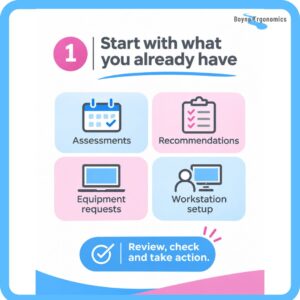
1. Start with what you already have
Before booking another round of assessments or buying new equipment, look at what’s already in place:
- When were your employees’ DSE (Display Screen Equipment) assessments last completed?
- Were the recommendations from those assessments actually implemented?
- Are there outstanding equipment requests or reported concerns?
- Have employees been shown how to set up and adjust their workstations?
This doesn’t need to be complicated. A quick look through assessment records, open actions and employee feedback will usually show where attention is needed.
An assessment is only useful if its findings are acted on. If recommendations have been sitting in a report for months, dealing with those is usually a better starting point than commissioning new assessments.
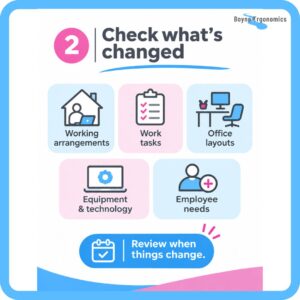
2. Check what’s changed
A workstation that suited someone two years ago may not suit them today. Under Regulation 72 of the Safety, Health and Welfare at Work (General Application) Regulations 2007, employers must assess the workstations of employees who habitually use display screen equipment. The Health and Safety Authority’s (HSA) guide to these regulations makes clear that assessments should be reviewed when there’s a significant change to the workstation or the work.
When planning for 2027, consider whether there have been changes in:
- Working arrangements, including home and hybrid working
- Work tasks, responsibilities or time spent at a screen
- Office layouts, furniture or shared and hot desks
- Equipment, technology or work processes
- Employee needs, including reported difficulties
Hybrid working is a common gap. An employee may have a well set-up office desk but spend several days a week at a home workstation that has never been assessed. The HSA’s Occupational Safety and Health Guidance on Remote Working is clear that the employer is responsible for making sure remote workstations are assessed by a suitably trained, competent person.
Not every change needs a full new assessment. What matters is having a process that flags when a review is due, rather than waiting for someone to report discomfort.
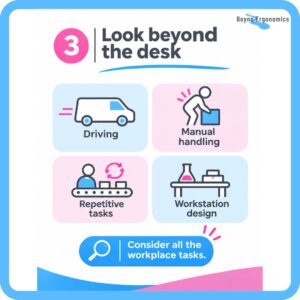
3. Look beyond the desk
Ergonomics isn’t only about chairs, keyboards and screens. It’s about how people interact with their work: the tasks, the equipment, the environment and how the work is organised.
Depending on your business, ergonomic risks may also come from:
- Driving: long periods in company vehicles or frequent travel between sites
- Manual handling: lifting, carrying, pushing or pulling loads
- Repetitive tasks: repeated movements, sustained postures or frequent reaching
- Workstation design: production benches, laboratory workstations and packing areas where working heights don’t suit the task
You may already have good controls in place for many of these. The aim is to find where risks remain or where arrangements have changed.
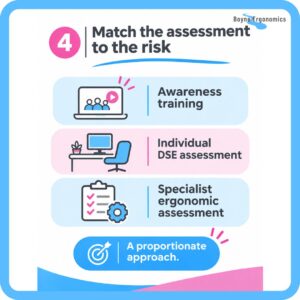
4. Match the assessment to the risk
Not every employee or task needs the same level of assessment. A proportionate approach puts your resources where they’re most needed:
- Awareness training helps employees understand common risk factors, adjust their own workstations and recognise when something isn’t working.
- Individual DSE assessments look at an employee’s actual workstation, tasks and working pattern, and recommend specific improvements.
- Specialist ergonomic assessments suit more complex situations, such as ongoing difficulties, demanding tasks, or cases where standard adjustments haven’t worked.
These do different jobs. An awareness webinar is a useful way to reach a large group, but it doesn’t replace the workstation assessment required under the 2007 Regulations. Equally, not every concern needs specialist equipment or an in-depth assessment.
The starting point is always understanding the work and the risk, not choosing a solution before anyone has looked.
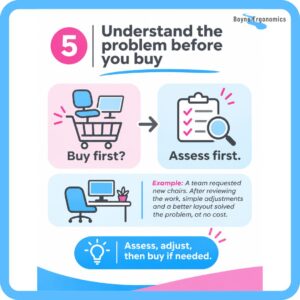
5. Understand the problem before you buy
It’s tempting to think better ergonomics means new chairs, sit-stand desks or specialist accessories. Sometimes new equipment is needed, but often it isn’t the answer.
Before purchasing, ask:
- What problem are we trying to solve?
- Has the employee’s workstation or task been assessed?
- Can existing equipment be adjusted or repositioned?
- Would a change in working methods or task organisation help?
- Is the proposed equipment suitable for this employee and their actual work?
Buying before you understand the problem often means wasted money, equipment that doesn’t fix the underlying issue, and more changes later.
6. Put a simple plan in place
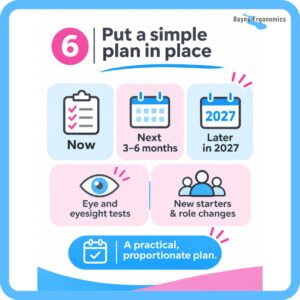
An ergonomics plan doesn’t need to be a long document. A short action plan with priorities, owners and timescales is enough for most organisations:
- Now: close out outstanding recommendations, reported discomfort and known risks.
- Next three to six months: review DSE assessment arrangements, identify people or areas needing assessment, and fill gaps in training or awareness.
- Later in 2027: plan equipment replacement, workplace changes, specialist assessments and regular reviews.
Two things are worth building into the budget that often get missed. First, eye and eyesight tests: Regulation 73 of the 2007 Regulations requires employers to make these available to DSE users. Second, a clear process for new starters, role changes and people moving between work locations. Some organisations find it cost-effective to train an in-house DSE assessor to handle these routinely.
With a process in place, ergonomics becomes part of everyday health and safety management rather than an occasional reaction to a problem.
Your 2027 ergonomics planning checklist
Use this as a quick self-check. Any “no” or “not sure” is a good place to start.
What you already have
- DSE assessments are in date for all employees who habitually use screens
- Recommendations from previous assessments have been implemented
- Outstanding equipment requests and reported concerns have been followed up
- Employees have guidance on setting up and adjusting their workstations
What’s changed
- Home and hybrid workstations have been assessed
- Hot desks and shared workstations have been reviewed
- Changes to roles, tasks, layouts or equipment have triggered a review
- There’s a process for assessing new starters and people changing roles
Beyond the desk
- Driving, manual handling and repetitive tasks have been considered
- Non-office workstations (labs, production, packing) have been reviewed where relevant
Planning and budget
- Eye and eyesight tests are offered to DSE users
- Equipment purchases are based on assessment findings
- Someone is responsible for ergonomics actions, with timescales
- A review date is set for later in 2027
Avoid the January scramble
The new year brings fresh priorities and competing demands. Waiting until then to think about ergonomics often means rushed decisions and reactive spending.
You don’t need to reassess everyone or replace equipment just because it’s a new year. You do need to understand the risks in the work being done, and have a sensible plan for managing them.
Good ergonomics isn’t about buying more equipment. It’s about making work better suited to the people doing it.
Need help planning for 2027?
At Boyne Ergonomics, I work directly with employers across Ireland to identify ergonomic risks and recommend practical improvements, in offices, home workstations, vehicles, laboratories and more physical workplaces. Whether you need a review of your DSE arrangements, assessments for your team, in-house DSE assessor training, or specialist support with a particular task, I can help you work out what needs attention and where to put your budget.
Get in touch to talk through your 2027 priorities. Email info@boyneergonomics.ie.
Sources
- Health and Safety Authority, Guide to the Safety, Health and Welfare at Work (General Application) Regulations 2007, Chapter 5 of Part 2: Display Screen Equipment (Regulations 70 to 73 and Schedule 4)
- Health and Safety Authority, Occupational Safety and Health Guidance on Remote Working
- Safety, Health and Welfare at Work (General Application) Regulations 2007, Regulation 73 (Law Reform Commission revised acts)